
Tag Archives: Spring 2026

Logo Design: Introduction to Logo Design Spring 2026

Welcome to our Illustrator Logo Design unit! In this unit, we’ll study the criteria that make a logo great and we’ll learn about the logo design process, in which we use research, conceptualization and our acquired knowledge of design, typography, shape, symbolism and color theory to produce logos that meet all the criteria that define great logo design.

Objective: To introduce the six principles of good logo design.

Student Friendly Objective: I can identify and explain the six principles of good logo design.

Web Link:

Six Principles of Great Logos

Topics Discussed:

  • Six Principles of Great Logos
  • Simple
  • Distinctive
  • Relevant
  • Memorable
  • Versatile
  • Timeless

Assignment:

Review the slideshow embedded below on the Six Principles of Great Logo Design. We will discuss the presentation and go in depth with each of the six principles in class.

Link:

Six Principles of Great Logos Presentation

Assigned: February 26th, 2026
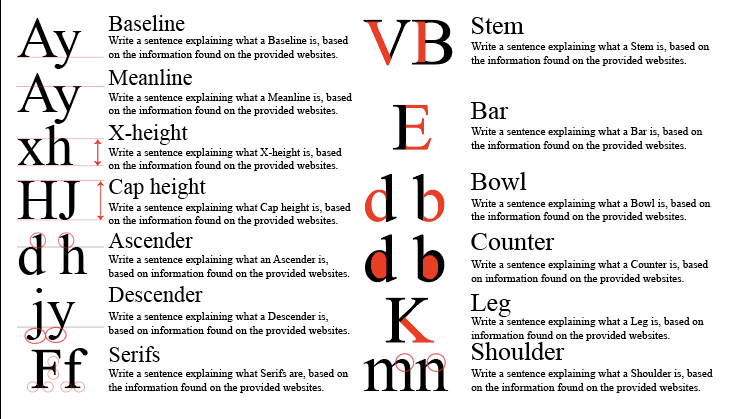
Type Week – Spring 2026: Typeface Anatomy

Objective:

I can use the Internet to find out more about the different parts of letters and what these parts are named.

Web Links:
A-Z Anatomy of Type
Type Anatomy: A Visual Guide to the Parts of Letters

Topics Discussed:

  • Typography
  • Letter Anatomy
  • Baseline
  • Meanline
  • X-height
  • Cap Height
  • Ascender
  • Descender
  • Serifs
  • Stem
  • Bar
  • Bowl
  • Counter
  • Leg
  • Shoulder

Assignment:

Visit the A-Z Anatomy of Type webpage or the Type Anatomy: A Visual Guide to the Parts of Letters in the links provided. Read through the articles to learn about Letter Anatomy, and the standard set of names for the parts of a letter.

  1. Open your Text Week document in Illustrator and go to the third (lower left) artboard.
  2. For each of the fifteen vocabulary terms:
    • Create a headline in Point Type with the vocabulary word itself
    • Use Area Type to write the definition of the vocabulary word. Use complete sentences, and you may copy and paste definitions (Just make sure you are copying the correct definition!).
    • Use Point Type and the line or shape tools to demonstrate what each of the vocabulary terms looks like. Use the pictures on the website as a guide, but DO NOT copy the website’s images into your document. Use a red-colored stroke on your lines and shapes to show the part of the letter the vocabulary word is describing.


  3. You should have a headline, a definition and a graphic for each of the following terms:
    • Baseline
    • Meanline
    • X-height
    • Cap Height
    • Ascender
    • Descender
    • Serifs
    • Stem
    • Bar
    • Bowl
    • Counter
    • Leg
    • Shoulder
  4. Save your document. We will work on the fourth artboard tomorrow to complete the Typography Week activities.

Assigned: February 19th, 2026
Teacher Pacing Due Date: February 20th, 2026